Showing posts with label CoreBASIC. Show all posts

Saturday, 2 February 2013

Writing a gyro driver for CoreBASIC

Today I'm in the office, tidying up source code to release to the world as a package.  The package is so that you can use all those drivers you'd find in CoreBASIC, but from C.  This is taking quite some time: writing the code is the easy bit, but writing the API documentation for users is hard.  I thought that I had done a good job of it when constructing all the CoreBASIC and CrossWorks Device Library code, but reviewing it, it just isn't up to scratch.

As part of this task, I thought I'd share how I typically develop a driver for inclusion in CoreBASIC.  Today, I'm constructing a driver for the L3G4200D MEMS gyroscope from STMicroelectronics.  I've had a couple of breakout boards from SparkFun for a while now, and I ordered two.

First things first...

One of the first things that I do is wire up the breakout board to test it out.  Historically, I hand-wired the boards to the SolderCore directly, but this is both time consuming and error prone.  When I change my software, I want to be able to test that I haven't broken anything by quickly grabbing a module from our extensive library of hardware, plug it in, and go!  Finding all the data on the chip, the breakout, and having prototyping wires srouting from boards takes much too much time.

Instead, what I do now is use a CoreProto board and attach the breakout to it.  Here's what I'll be snapping together:


I place the module on the CoreProto and wire-wrap it.  My soldering and wire-wrapping skills are not the best, and I try to remove the flux with a cleaner, but to be honest, it's not my day job.  This is what I end up with:


Once I've constructed that, I plug into into a SenseCore, which is installed on top of a SolderCore.  Now I have a great sensor platform! Whenever I want to whip up a demonstration, or make sure that the latest modifications to the software haven't impacted the existing drivers, all I need to do is take a SolderCore, a SenseCore, and plug in the SExI-format module and I'm good!

This is what it looks like:


So now I am ready to try some software.

First connection

I have my hardware set up, so I need to see if the module is responding.  To do this, the easiest thing is to use CoreBASIC interactively and poke the sensor.  It's much faster to do this than construct a program in C, compile it, fix errors, download it, and debug why the blazes it's not working!  As CoreBASIC already has full support for I2C and SPI, you have a great test platform at your fingertips, so why use something more fiddly and less immediate?

Reading the L3G4200D datasheet, there's a "Who am I" register at address 0x0F that should read back 0xD3.  So, fire up CoreBASIC and try it:


Great!  The sensor is working.  I can communicate with it.  From there on, I can play with the registers from the datasheet in CoreBASIC and make sure I understand what I am seeing.

Write it in C...

From there, it's a short distance to write the code in C and integrate it into the set of confidence tests.  I write the driver in C and use CrossWorks to compile it into the CrossWorks Device Library:


The I write the confidence tests to ensure that I can communicate and demonstrate that it works as I expect:

 
Running this project, I can see the output change when I spin the sensor:


So, now I have the sensor working in C.  What I need to do now is construct the CoreBASIC interface onto this sensor, which is pretty much gruntwork because the hard work is already done:
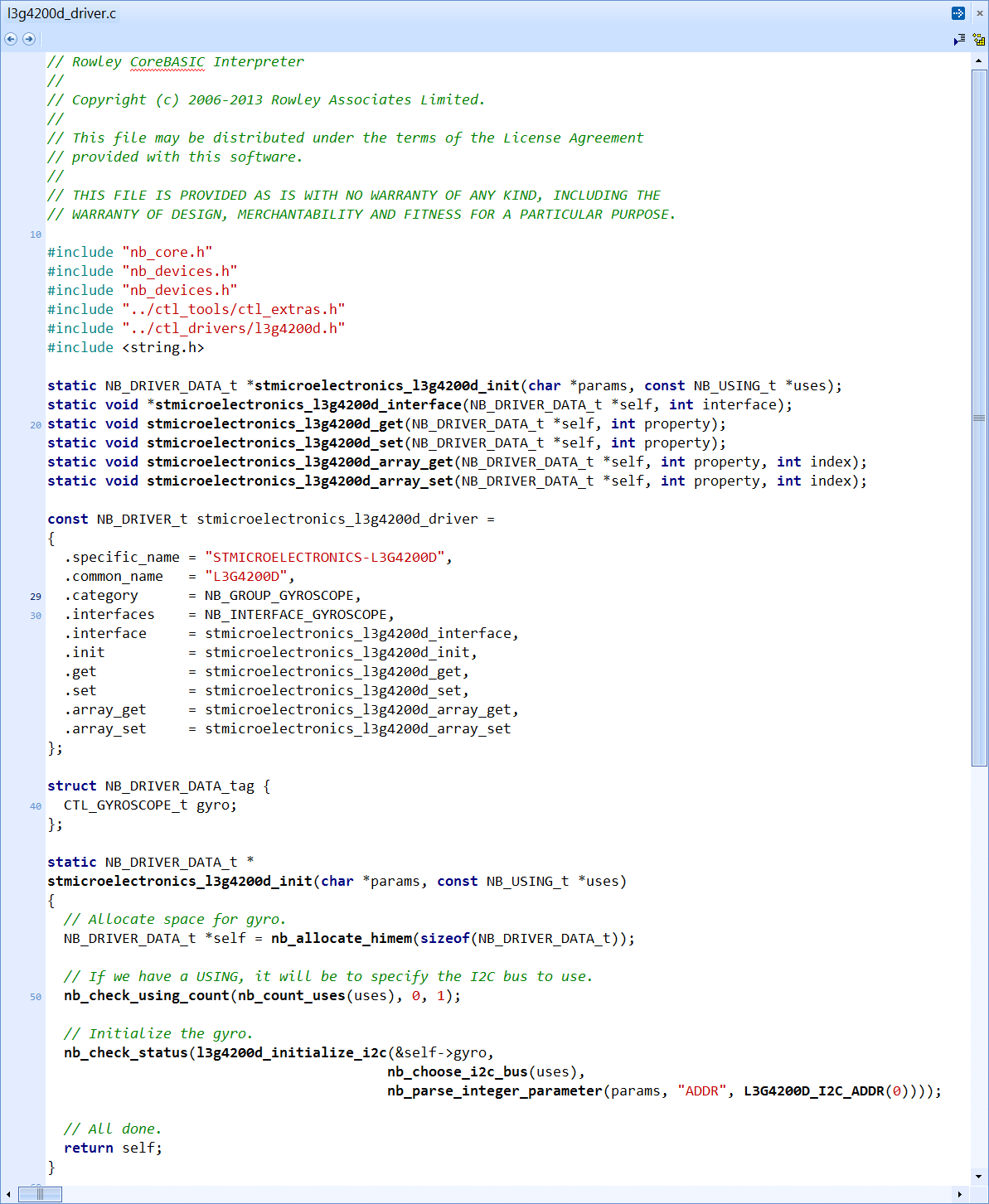

Drum roll please...

And now, of course, it's available in CoreBASIC!


How easy is that to read a gyro?  A CoreBASIC user can do it, interactively, in just two lines.  No C compiler, no compilation, nothing. Immediate.

Statistics

So, here are some vital statistics for this task.  The whole exercise took about four hours to integrate the sensor: from making the SExI module to firing up CoreBASIC and printing the gyro readings.

The low-level driver code, confidence tests, and CoreBASIC integration is about 500 lines of code, but that does not include all the framework functions such as I2C drivers, gain and bias application, bus selection, and so on, as that is already written.

However, with all that code written, it immediately works on all implementations of CoreBASIC (SolderCore, Freedom Board, Raspberry Pi) and on all C platform targets that we support.  Great!

Monday, 28 January 2013

Twittering and signatures

One of the things that I want to be able to do at some point is connect to a server using a secure socket.  That's a little way off yet, but isn't so distant that I can put it out of my mind.

Many Internet-of-Things devices might want to connect securely; and more than that, robust authentication is also necessary.  Simple authentication is being discarded and OAuth is starting to become the norm for services such as Twitter and COSM.

In view of that, I constructed an example a little while ago that will sign a Twitter API call using an HMAC-SHA1 signature.  Rowley Associates has an established history in all this crypto boffinry as we wrote compilers under contract to Microsoft for their smart card virtual machine, and we also wrote the SmartWorks for MULTOS product which was bought out, rebranded, and now rests with MAOSCO as SmartDeck.  This signing code isn't hardcore crypto: it's rather simple, in fact.

So, if you're interested in the signing code, you'll find it here:

http://www.soldercore.com/manual/corebasic_twitter_oauth_signature.htm

This example takes the example from Twitter of constructing an OAuth signature and codes it up in CoreBASIC.  When I run the program, I get the correct signature:


So, we're on the way to direct posting to Twitter without using a proxy application!

Wednesday, 23 January 2013

Classic Controller + Ardumoto = Kiddie Toy

Today I turned my attention to the list of e-mails that I receive outside the helpdesk about CrossWorks and SolderCore.  With a weekend and a couple of extra days off, you wouldn't believe the amount of stuff that piles up!  It's amazing how many customers can order the wrong thing, or how many can't read the manual, or can't even be bothered to look at the CrossWorks manual and use the helpdesk as an on-line help resource.

With those things put to bed, I turned to a question about the PWM output of the SolderCore when a pin is configured as a digital output. I hooked up a scope to the PWM output of the SolderCore and things actually looked good, pretty much as I expected. I need to test some more tomorrow to confirm things.

To put this to good use, I wrote a small CoreBASIC program that uses a Nintendo Classic Controller to control the left and right tracks of a hastily-constructed robot. From the bottom up, the robot is built from a Polulu chassis and motors, a liquidware LiPo battery pack, a SparkFun Ardumoto, a SolderCore, and a SenseCore with a CoreWii adapter fitted:


Here's the CoreBASIC application to exercise this contraption:

' Call up required drivers.
INSTALL "NINTENDO-CLASSIC-CONTROLLER" AS CONTROLLER
INSTALL "SPARKFUN-ARDUMOTO" AS MOTORS

' Run until I die.

WHILE TRUE

  ' Read vertical positions of both controllers.
  THROTTLE = CONTROLLER.V

 
' Ask left and right motors to follow the joysticks.
  MOTORS.LEFT = THROTTLE(0)
  MOTORS.RIGHT = THROTTLE(1)

WEND

END


Now when you move the left joystick forward or back, the left motor's speed and direction follows. Same for the right motor. When you pop the robot on the floor, you can drive it around just like when you had one for Christmas!

I'll blog a bit more about PWM tomorrow along with controlling the robot with a Nintendo Nunchuk controller, as long as I have some spare time.

Saturday, 19 January 2013

Tidying up and Pressure Sensors

So I came into the office at the weekend to do some tidying up before going away to Wales for my wife's birthday surprise.  I didn't expect it to snow, and where we're going to stay is in a red Snow Warning area.  Great!

I took the opportunity to start sorting out the multitude of sensors I've been ferrying back and forth between the office and the Curtis family home each day.  My rucksack is usually stuffed with bits and pieces that I convince myself I might need at home for the night's coding, but in reality I only ever break out a couple of items and concentrate on them.

So today I mounted a SparkFun BMA180 breakout on a SExI prototyping board, wire-wrapped the connections, and tested that I could address the accelerometer.  Sure, yes, that worked, so I'll write a driver for it one evening as all the Bosch Sensortec acceleration sensors have the same type of memory map and set of capabilities.

But I also constructed a shield to take the DIL modules that ST provide for evaluation of their sensors. I happen to have an LPS331AP DIL module, so I plugged it in and labeled the shield so I know what it's for.


The easiest way to test the sensor out is a few lines of CoreBASIC.  Telnet into the interpreter and type away!  I know my device has address 0xBA and the LPS331AP has a "Who Am I" register at address 0x0F that should read back 0xBB.  Will it?

>i2c 0xba write 0x0f read 1 to x
>print hex expand x
["BB"]
>

Excellent!  It does!  I can address the sensor and away we go!  After a bit of reading and coding, I constructed the C and CoreBASIC drivers for it:

>install "lps331ap" as lps331
>print lps331.temp
26.3229
>print lps331.pressure
99078.1
>

OK.  Brilliant.  That driver will make the next release of CoreBASIC!

Just time to finish up, tidy up, wrap up, and go home.